
TK999 Withdrawal – A Complete Guide to Secure Transactions
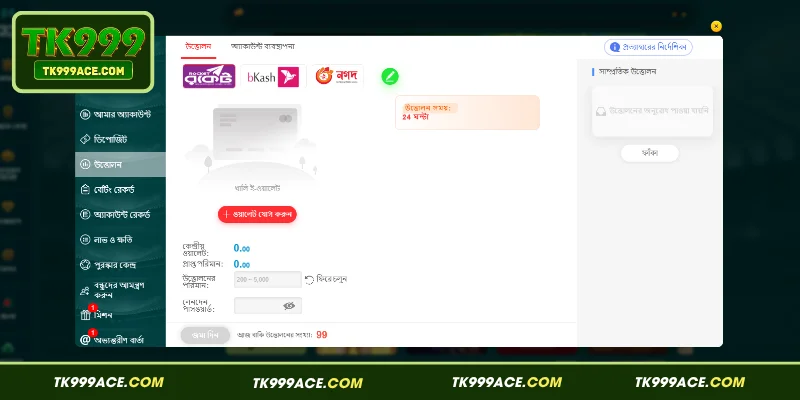
TK999 Withdrawal is an important step that allows users to receive available funds from their accounts through designated payment methods. The TK999 panel provides options for selecting mobile financial services such as Rocket, bKash, and Nagad. The displayed withdrawal processing time is 24 hours, and the withdrawal amount is shown as ranging from 200 to 5,000. Therefore, before submitting a withdrawal request, it is important to link your wallet, enter accurate information, and prepare your transaction password.
How to Link an E-Wallet Before Making a TK999 Withdrawal
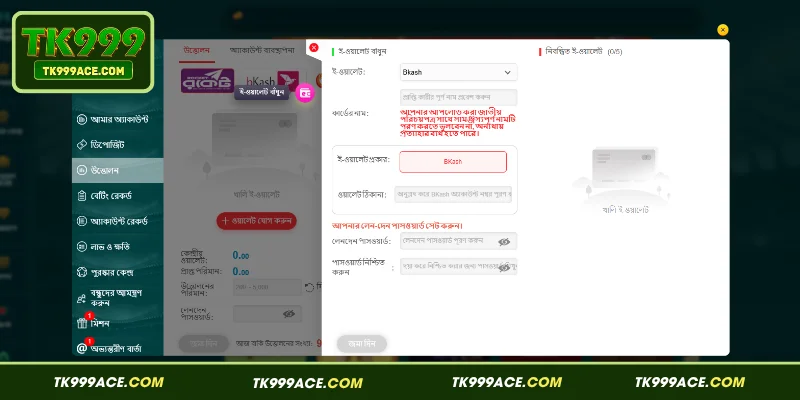
Before initiating a withdrawal, linking an e-wallet is an important step. The screenshot shows an “Add Wallet” button and a form for linking an e-wallet. The form first provides an option to select the wallet type. In the example shown, bKash is selected.

When linking a wallet, you may need to provide the following information:
- Enter the recipient’s name or cardholder name in the designated field.
- Provide your full name in accordance with the instructions and ensure that it matches the relevant identification documents, if required.
- Select the correct type of e-wallet.
- Enter the required wallet details, such as the associated bKash account number.
- Set a transaction password and confirm it as instructed.
The screenshot includes a warning about ensuring that the name matches the information on the relevant identification document. Incorrect spelling or numbers may cause complications during the application process. Rather than repeatedly changing your wallet details, carefully verify all information before submitting it.
Step-by-Step Guide to the TK999 Withdrawal Process
To complete a TK999 withdrawal, users need to follow several straightforward steps. According to the displayed interface, the process begins with selecting a payment method and continues through submitting the withdrawal request.
Step 1: Select the Withdrawal Section
First, log in to your TK999 account and navigate to the “Withdrawal” section on the left-hand side. Then select the payment method available to you from the displayed options, such as Rocket, bKash, or Nagad.
After selecting a payment option, the corresponding withdrawal panel will open. It may display details such as the central wallet and the amount to be received. Review the information carefully before proceeding to the next step.
Step 2: Link Your E-Wallet
If you have not linked an e-wallet yet, click the “Add Wallet” option. In the screenshot, selecting bKash displays separate fields for entering the recipient’s name and wallet number.
Enter the information according to the displayed instructions and carefully check the bKash account number. Before submitting the form, verify both the name and number to reduce the risk of errors.
Step 3: Enter the Withdrawal Details
After linking your wallet, return to the withdrawal page and enter the desired amount in the designated field. The screenshot displays a withdrawal range of 200 to 5,000, so select an amount within the displayed limits.
Next, enter the correct password in the transaction password field. Once all the information has been entered, review the withdrawal amount, selected wallet, and transaction password details to help prevent mistakes.
Step 4: Verify the Information and Submit Your Request
Finally, review the withdrawal details once more and click the “Submit” button. After submitting the request, you may be able to monitor its status through the relevant transaction records section.
The screenshot indicates a withdrawal processing period of 24 hours. Allow the stated processing time and check the transaction status if necessary.
TK999 Withdrawal Processing Time and Amount Limits
According to the information displayed in the second screenshot, the withdrawal section indicates a 24-hour processing period. This information is useful because it gives users an indication of the expected processing time before submitting a request. However, the actual completion time may vary, so the current information displayed in your account should take precedence.
The screenshot shows a withdrawal amount ranging from 200 to 5,000. Before entering an amount below 200 or above 5,000, check the current limits shown by the system. Reviewing your available balance, the expected amount to be received, and the applicable withdrawal limits can help reduce the risk of submitting an incorrect request.
Important Details to Check During a Withdrawal
Verifying your information before submitting a withdrawal request is one of the most important steps. Incorrect details, especially when adding a new wallet, may cause problems during processing. Keep the following points in mind:
- Select the correct wallet type.
- Check the account number or wallet address digit by digit.
- Ensure that the recipient’s name matches the information required by the platform.
- Keep the withdrawal amount within the displayed limits.
- Enter the correct transaction password.
- Save or review the withdrawal record after submitting your request.
- Never share your private transaction password with anyone else.
In particular, the screenshot shows a separate field for the transaction password and a confirmation field. Avoid confusing your transaction password with your regular login password. If you are uncertain about any information, read the displayed instructions before submitting your request.
What to Consider When Selecting a TK999 Withdrawal Wallet
Selecting the correct wallet can make it easier to complete the withdrawal form. According to the payment options shown in the screenshot, consider the following points:
- Check Available Payment Methods: Choose the payment method currently available in your account from Rocket, bKash, or Nagad.
- Verify the Wallet Number: Enter the account number associated with your selected wallet accurately.
- Check the Recipient’s Name: The screenshot includes a separate field for the recipient’s name when bKash is selected. Enter the name according to the displayed instructions.
- Review the Information Again: Carefully check the name, wallet number, and selected payment method before submitting your request.
- Follow the Platform’s Instructions: If you select Rocket or Nagad, complete the form according to the information displayed in the corresponding payment panel.
Additional Information: TK999 Privacy Policy – Data Security Under Modern Standards
Practical Tips for Completing TK999 Withdrawals More Efficiently
Proper preparation can help make the withdrawal process more organized. First, link your wallet in advance and verify the information. Then check your available account balance and choose an amount within the minimum and maximum limits displayed by the system.
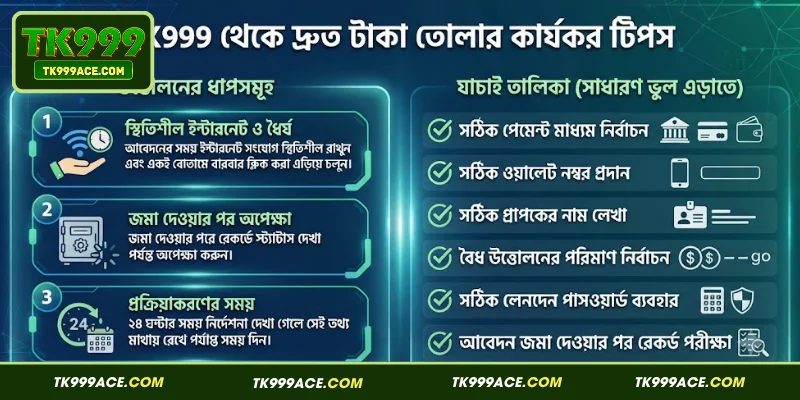
Keep your internet connection stable while submitting the request and avoid clicking the same button repeatedly. After submission, wait for the transaction status to appear in your records. If the platform indicates a 24-hour processing period, allow sufficient time for the request to be processed.
You can also use the following checklist to avoid common mistakes:
- Select the correct payment method.
- Enter the correct wallet number.
- Provide the correct recipient name.
- Choose a valid withdrawal amount.
- Enter the correct transaction password.
- Check the transaction record after submitting the request.
Conclusion
Before completing a TK999 Withdrawal, carefully verify your wallet details, name, account number, withdrawal amount, and transaction password. The screenshots show a withdrawal amount range of 200–5,000, a 24-hour processing period, and payment options such as Rocket, bKash, and Nagad. Following the current information displayed in your account can help you understand the process and submit your request more systematically. Always verify payment details, protect your confidential information, and review the applicable terms before initiating a financial transaction.